Vanquish Overlay
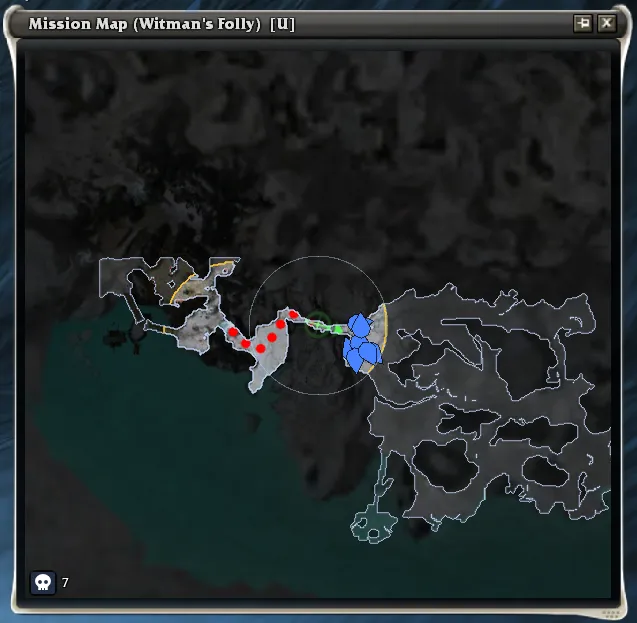
The Vanquish Overlay draws extra information on top of the in-game mission
map (U by default) to help you plan and finish vanquishes in Hard Mode.
It complements the small numeric Vanquish widget
by showing where the work is, not just how many enemies are left.
This is not a separate map — the overlay paints directly on top of the game’s mission map, so it scales and pans with the map itself.
Features Overview
- Map border and inaccessible areas are outlined and shaded so the walkable region of the zone is obvious at a glance — particularly useful in maps with disjoint islands or hidden corners.
- Fog of explored area dims the parts of the zone you haven’t been near yet during this instance. As you walk around the fog clears, with a bright frontier edge marking the boundary of explored territory. Restarting the instance resets the fog.
- Compass range circle centered on your character shows the same radius the minimap uses, so you can judge how much of the zone is currently within enemy-tracking range.
- Enemy markers appear for every foe that has entered compass range:
- Blue — alive and currently tracked.
- Orange — last known position, with a small arrow pointing in the direction they were last moving. Useful for catching wanderers that left compass range before you could engage.
- Enemy count label shows how many of the foes that count toward the vanquish are currently located (alive + last-known), separate from the global “killed / remaining” figure on the Vanquish widget.
Controls
- A small skull button (
💀) sits in the bottom-left corner of the mission map and toggles the overlay on and off. Hover it for a tooltip describing the current state. - Right-click the mission map to open its context menu. While the overlay
is active and you are in an explorable area, two extra entries appear:
- Navigate to closest enemy — auto-runs your character toward the nearest tracked enemy.
- Stop navigating — cancels an in-progress navigation.
- Ctrl+click on the numeric Vanquish widget reports the vanquish status to party chat, including the located-enemy count contributed by the overlay.
When it’s visible
The overlay only draws while you are in an explorable area, with the mission map open, and with the overlay toggled on. Outside those conditions the skull button is shown disabled so you can still toggle the setting from inside an outpost.
Settings
Color and size controls are under Settings → Vanquish Overlay:
- Inaccessible area — fill color for non-walkable space outside the map border.
- Map border — outline color of the walkable region.
- Unexplored fog — fill color of areas you haven’t visited this instance.
- Frontier edge — color of the leading edge of explored territory.
- Compass range — color of the circle around your character.
- Enemy (alive) and Enemy (last known position) — marker fill colors for the two enemy states.
- Enemy outline — outline color drawn under every enemy marker for contrast against the map.
- Enemy marker size — pixel radius of each marker on the mission map, 3 to 20.