Hero Builds
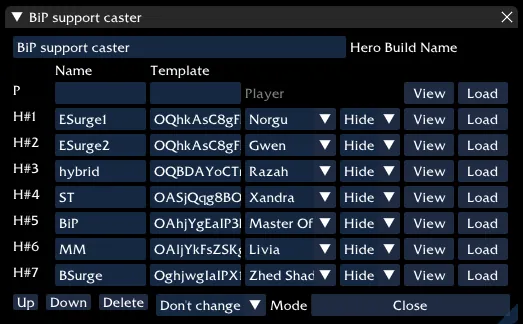
Open from Toolbox Hero Builds or /show herobuilds . Per-window options live under Settings Hero Builds .
The Hero Builds window allows you to create and edit teambuilds for your heroes, which can then be loaded directly onto them. This feature streamlines the process of setting up your hero team with specific builds and configurations.
Features
-
Create and Edit Teambuilds: Click “Add Teambuild” to create a new one, or click on an existing teambuild’s name to edit it. Each teambuild can be independently moved and re-sized.
-
Load Teambuilds: Clicking “Load” on a teambuild will kick all your current heroes, add the chosen heroes to the party, and load the builds onto them.
-
Customize Builds: For each build in a teambuild, you can:
- Set the build name
- Paste the template code
- Select the specific hero
- Choose whether to show or hide the hero’s panel
- Set the hero’s behavior (Fight, Guard, or Avoid Combat)
-
View/Send Builds: The “View” button allows you to view the build in-game. Ctrl + Click to Send the build to chat.
-
Manage Teambuilds: Use “Up” and “Down” to change a teambuild’s position in the list, and “Delete” to remove it entirely.
-
Mode Selection: The Mode dropdown allows you to automatically change to Normal or Hard Mode when loading the team.
-
Add Current Team: You can quickly create a new teambuild based on your current team setup.
-
Hero Selector: Shows hero profession icons and uses each mercenary hero’s in-game name when available.
Settings
- Hide when entering explorable: Automatically hides the Hero Builds window when entering an explorable area.
- Only show one teambuild at a time: Closes other teambuild windows when you open a new one.
- Sort heroes by profession: Groups heroes by profession in the hero selector dropdown.
Chat Commands
/heroteam [hero_build_name] or /herobuild [hero_build_name]: Loads the specified hero teambuild.
Notes
- Make sure you’re in an outpost before trying to load a hero teambuild.
- The window will automatically save your changes when you close it.