Completion Window
Open from Toolbox Completion or /show completion . Per-window options live under Settings Completion .
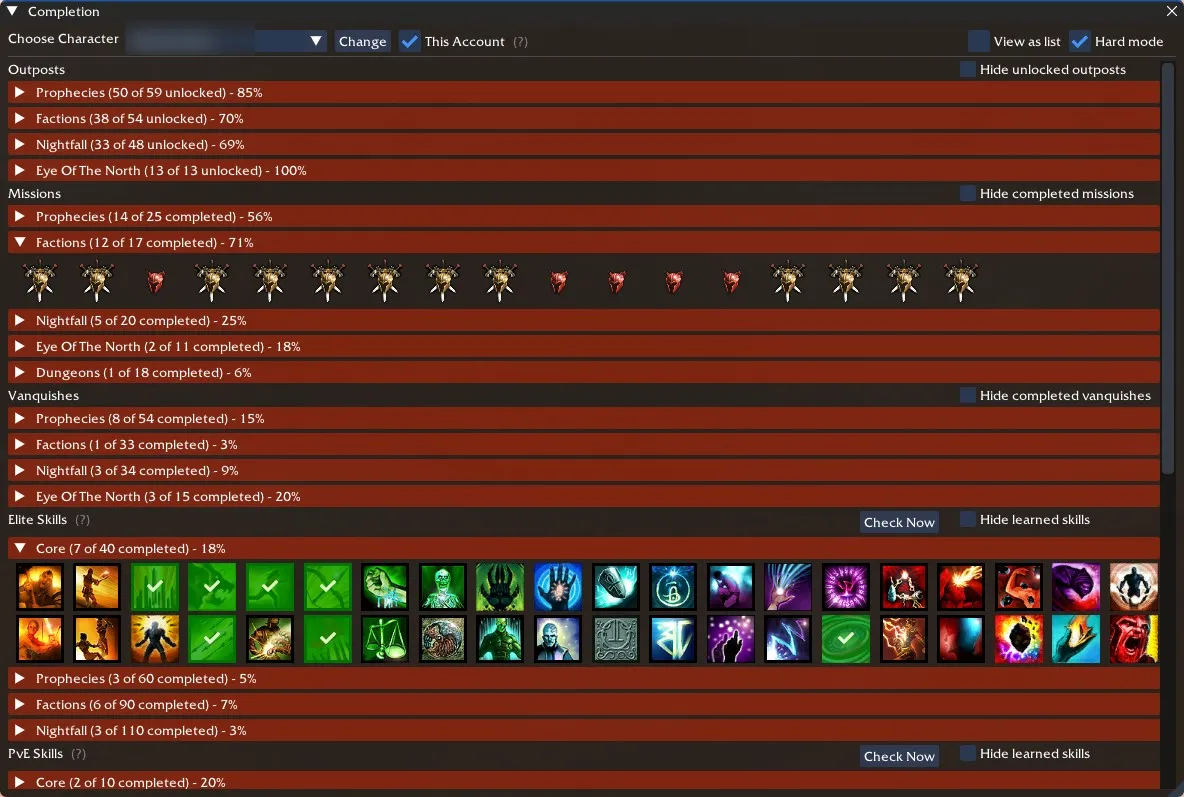
The Completion Window in GWToolbox++ allows you to track your progress across various aspects of Guild Wars. This feature provides an easy way to visualize your achievements, unlocks, and completions for different characters.
Features
- Track progress for missions, vanquishes, skills, and more
- View completion status for different campaigns
- Monitor Hall of Monuments achievements
- Filter and sort completion data
- Switch between different characters
Usage
To access the Completion Window:
- Open the GWToolbox++ main window
- Click on the “Completion” button
The window displays various categories of completion data:
- Outposts
- Missions
- Vanquishes
- Elite Skills
- PvE Skills
- Heroes
- Unlocked Item Upgrades
- Festival Hats
- Hall of Monuments
For each category, you’ll see:
- Total completion percentage
- Detailed breakdown of individual items
- Option to hide completed/unlocked items
Character Selection
You can view completion data for different characters:
- Use the character dropdown at the top of the window
- Select the desired character
- The window will update to show that character’s completion data
Filtering and Display Options
- Toggle between list and grid view
- Hide completed missions, vanquishes, or unlocked skills
- Switch between normal and hard mode for applicable categories
Hall of Monuments
The Completion Window includes a detailed breakdown of your Hall of Monuments achievements:
- View progress for all five monuments
- See dedicated items and points earned
- Track individual achievements within each monument
Updating Data
The Completion Window automatically updates as you play. For Hall of Monuments data, it fetches information from the official Guild Wars 2 HoM website.
Notes
- Completion data is character-specific, except for account-wide achievements
- Some data may require specific actions in-game to update (e.g., talking to NPCs for festival hats)
- The window provides a comprehensive overview of your Guild Wars journey and helps identify areas for further exploration or completion