Travel Window
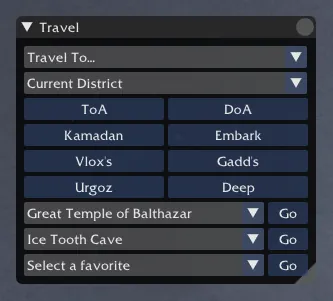
Open from Toolbox Travel or /show travel . Per-window options live under Settings Travel .
The Travel window allows you to quickly travel to any outpost in the game that you have unlocked.
Main Features
- Outpost Selection: Choose from a dropdown menu of all available outposts.
- Quick Travel Buttons: Instantly travel to commonly visited outposts.
- District Selection: Choose which district to travel to.
- Favorites: Set and use your favorite outposts for quick access.
Usage
- Open the Travel window.
- Select an outpost from the dropdown menu or use one of the quick travel buttons.
- Choose a district if desired.
- Click to travel to the selected outpost.
User Travel Destinations
The quick-access buttons in the Travel window are fully configurable. To manage them, go to Settings Travel and scroll to the User Travel Destinations section:
- Add: Click “Add Destination” to append a new button. Select the outpost, district, and optional district number for each entry.
- Remove: Click the trash button on any row to delete that destination.
- Reset: “Reset to Defaults” restores the original set of destinations.
Note: reordering destinations is not currently supported in the UI.
Chat Commands
Use /tp, /to, or /travel followed by the outpost name or abbreviation to quickly travel. For example:
/tp doafor Domain of Anguish/tp embarkfor Embark Beach/tp ghto enter or leave your guild hall/tp zb|zm|zvfor Zaishen Bounty/Mission/Vanquish, will take you to GtoB to accept the quests if you don’t have them yet
You can use various shortcuts and partial names for outposts and districts. Some examples include:
kama ae1- Kamadan, American district 1fa l- Fort Aspenwood (Luxon)deep ee- The Deep, Europe English district, reqauires a scroll in inventory or chesteee- Embark Europe English
Additional Features
- Automatically retry if a district is full (can be toggled in settings).
- Option to close or collapse the window after traveling.
- Special handling for elite areas like The Deep and Urgoz’s Warren.
- In pre-Searing Ascalon, only the 5 pre-Searing outposts are available.
Settings
Open via Settings Travel .
- Close on travel: Automatically close the Travel window after selecting a destination.
- Collapse on travel: Automatically collapse the Travel window after selecting a destination.
- Automatically retry if the district is full: Keep trying to enter a full district. Use
/tp stopto cancel. - Use English map names: When unchecked, the
/tpcommand uses localized map names matching your current language. - Show Zaishen quest buttons: Toggle the Zaishen Bounty, Mission, Vanquish, and Combat travel buttons in the Travel window.
- User Travel Destinations: Add or remove the quick-travel buttons shown in the Travel window (see above).
- Outpost Aliases: Add, edit, or remove shorthand aliases used with the
/tpcommand.
Notes
You can use the following shortcuts instead of [dest]:
fav1,fav2,fav3for your favorite locationsghto enter or leave your guild hallgh [tag]for any guild hall in your alliance - the tag is not case sensitive.toa- Temple of the Agesdoa,goa,tdp- Domain of Anguisheee- Embark Beach, Europe Englishgtob- The Great Temple of Balthazarla- Lions Archac- Ascalon Cityeotn- Eye of the Northhzh- House Zu Heltzerctc- Central Transfer Chambertopk- Tomb of the Primeval Kingsra- Random Arenasha- Heroes’ Ascentfa- Fort Aspenwoodjq- Jade Quarry
The [dest] argument also does a partial search on outpost names and returns the best match. Some examples include:
kama ae1- Kamadan, American district 1aurora int- Aurora Glade, International districtsunspear sanc eg- Sunspear Sanctuary, Europe German districtfa l- Fort Aspenwood (Luxon)jade quarry k- Jade Quarry (Kurzick)shing fr- Shing Jea Monastery, Europe French districtvizunah square l- Vizunah Square, Local Quarterdeep ee- The Deep, Europe English districtfoib- Foibles’ Fair (when on a Pre-Searing character)
The [dest] argument also does a partial search on dungeon names:
catacombs of kathandrax,rragars menagerie,cathedral of flames- Doomlore Shrineooze pit,darkrime delves- Longeye’s Ledgefrostmaws burrows,sepulchre of dragrimmar- Sifhallaravens point- Olafsteadvloxen excavations- Umbral Grottobogroot growths- Gadds Encampment
The last word of the [dest] argument can also be a district shortcut as shown in the above examples:
ae- American (any district)ae1,ad1- American district 1int- International districtee- Europe English districteg,dd- Europe German districtef,fr- Europe French districtei,it- Europe Italian districtes- Europe Spanish districtep,pl- Europe Polish districter,ru- Europe Russian districtak,kr- Asia Korean districtac,atc,ch- Asia Chinese districtaj,jp- Asia Japanese district